
My 2026 Guide to Monopoly GO Tycoon Stats: View, Share, and Analyze
Monopoly GO Tycoon Stats reveal monthly progress, while this guide explains how to view, share, and understand every key metric.
As a longtime Monopoly GO player, I’m always looking for ways to measure my progress beyond the immediate thrill of buying properties and bankrupting rivals. In 2026, the game’s Tycoon Stats feature remains one of the most underrated tools for doing exactly that. It offers a monthly snapshot of my achievements—a kind of highlight reel that shows how I’ve performed across different aspects of the game. Whether I want to brag to friends or spot areas where I can improve, Tycoon Stats gives me a quick, engaging overview. The stats are updated every month, so I make it a habit to check them as soon as the new cycle begins. Here’s how I view and share my Tycoon Stats, along with a breakdown of what each metric actually means.
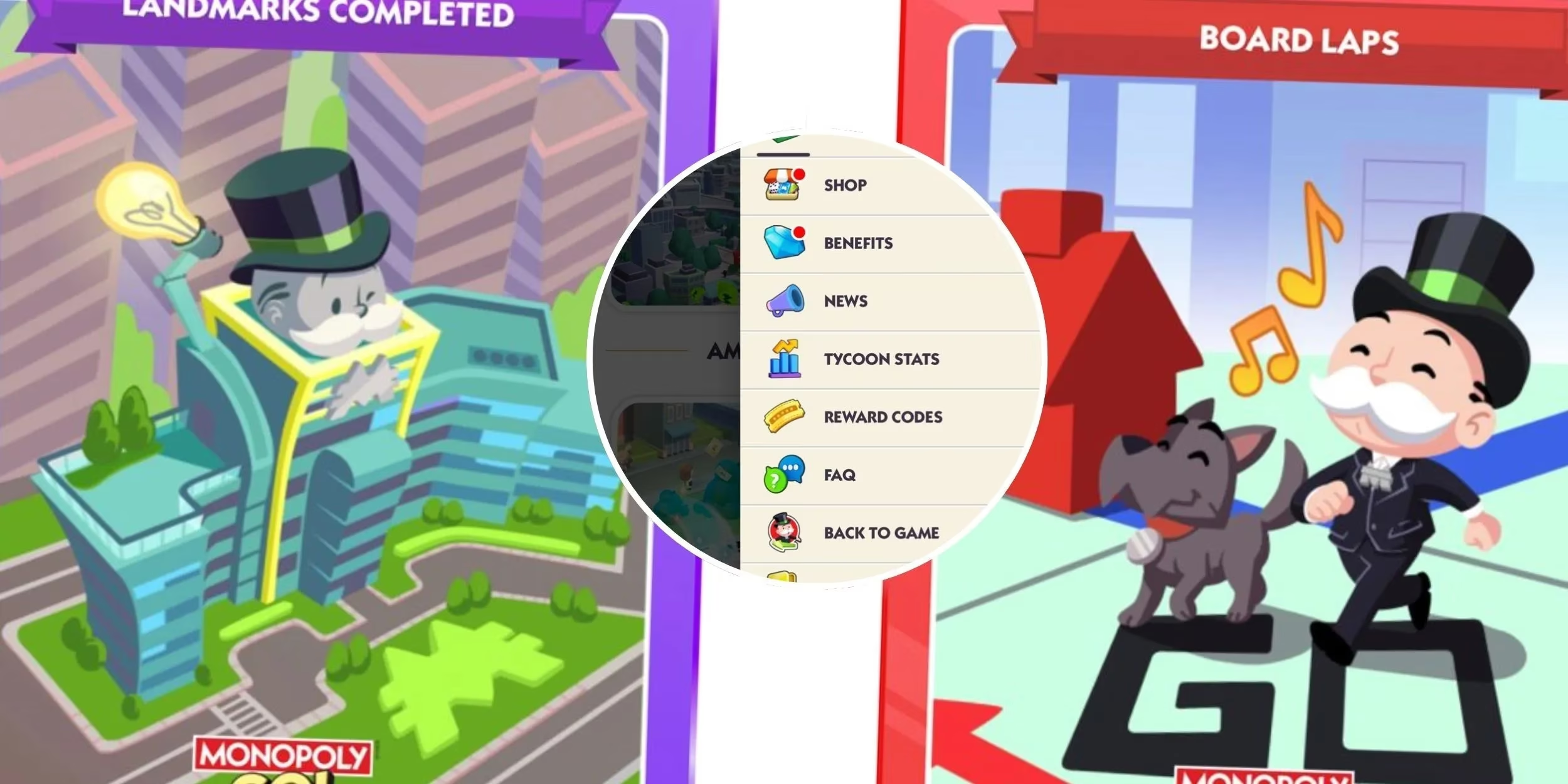
How I View and Share My Tycoon Stats
When I first discovered the feature, I was surprised that it lives outside the mobile app itself. The process is straightforward, but it requires a quick detour to the official Monopoly GO website. Here’s the exact routine I follow:
-
I open the official Monopoly GO website and log in with my game account.
-
I click the three horizontal bars in the top-right corner to open the side menu.
-
From there, I select Tycoon Stats. The page immediately loads my stats for the previous month.
-
I swipe through the slideshow to see details like the number of landmarks I built, the rent I earned, and more.
-
If I want to show off a particular achievement, I tap the Share button at the bottom of each stat picture. This lets me post directly to social media without any extra steps.
I appreciate that the sharing option is built into each individual stat, so I can highlight just the numbers I’m most proud of—like a huge rent haul or a high number of successful Shutdowns—without sharing the entire slideshow.

The Five Tycoon Stats That Matter
Monopoly GO tracks five distinct metrics in the Tycoon Stats dashboard. Each one tells a different story about my playstyle, and together they form a well-rounded picture of my monthly activity. I’ve summarized them below, along with what I’ve learned from monitoring them.
| Stat Name | What It Measures | Why I Pay Attention |
|---|---|---|
| Laps Completed | How many times my token has moved around the Monopoly board. | It’s a solid indicator of time spent playing—more laps usually mean more engagement. |
| Mega Builder | The number of landmarks I’ve built across different cities. | A high score here shows I’m expanding my empire efficiently and completing boards. |
| Shutdowns | Landmarks demolished during Shutdown attacks, plus my success percentage and overall ranking. | This is my competitive side—it tells me how effective I am at disrupting other players. |
| Community Hero | How many times I’ve helped others open their Community Chest. | It highlights my cooperative side and even shows the name of the player I’ve helped most. |
| Rent Collected | Total cash earned from rent, along with the name of the player who paid me the most. | A direct measure of my income and a fun way to see who my biggest “contributor” was. |
Each stat is presented as a colorful, shareable slide, which makes reviewing them feel less like a chore and more like a mini celebration of my progress. I’ve found that the Mega Builder and Rent Collected stats are the most useful for tracking my economic growth, while Shutdowns and Community Hero give me a sense of how I interact with the wider player base.
Why I Check My Tycoon Stats Every Month
Beyond the bragging rights, Tycoon Stats help me pinpoint strengths and weaknesses. For example, if my Community Hero score is low, I know I’ve been too focused on solo play and should spend more time helping friends with their Community Chests. Conversely, a high Shutdowns percentage tells me I’m effectively using attacks to slow down rivals. Comparing my stats month-over-month has become a fun ritual—it’s like a report card for my tycoon career. And since the data resets monthly, there’s always a fresh goal to chase. In 2026, with Monopoly GO constantly adding new events and boards, these stats feel more relevant than ever. I’d recommend every player take five minutes to log in, swipe through their slideshow, and share their favorite numbers. It’s a small feature, but it adds a satisfying layer of reflection to the endless hustle of becoming the ultimate business tycoon.